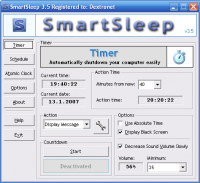
SmartSleep is new and free to try utility for shutting down computer at specified time, with task scheduler and atomic clock synchronization.
Supports: Shutdown, log off, hibernate, suspend, reboot, black screen, file execution, display message.
SmartSleep is a new and free to try utility for shutting down your computer at a specified time. You can also schedule these tasks, so it can turn off your PC every Sunday at 18:00 and so on. However, SmartSleep can do way more than that!
SmartSleep supports these operations: Shutdown, Log Off, Reboot, Black Screen, suspend, Hibernate, File Execution and Display Message.
The shutdown utility has some really neat functions - you may display black screen during countdown so you can save the life of your monitor. It's also possible to slowly reduce the speaker volume, so if you are listening to music or watching films before falling asleep, you will love this.
With SmartSleep you may force all applications to quit during shutdown, even those which aren't responding, so it will turn off your PC always. You also can select program which will be executed before shutdown.
Unlike in many other applications, you may set-up date and seconds, so PC is turned off exactly when you want. Combined with Atomic Clock Synchronization feature, the shutdown time is always very accurate.
SmartSleep has a clear and easy to use interface that supports minimizing to system tray. It can be launched automatically at system startup and remembers everything you set it too. You may set-up time by absolute time (16:30:26) or by relative time (12 minutes from now).
Shutdown scheduling is very powerful. Tasks can be performed once, every day, or on specified days (Monday and Thursday, only weekends, all days expect Friday etc). You may easily turn scheduling on/off in options and individual tasks can be turned on/off with checkboxes upon them. For example, you may set 'lunch reminder' to 12:00 every day except the weekend, start program to clear your system at Sunday 21:00 and turn off your PC at 22:00 every weekend.
You can turn on shutdown confirmation window with timeout to prevent accidents.
Comprehensive help file included.Requirements: SmartSleep does not need any new or expensive hardware Operating system: Win98,WinME,Windows2000,WinXP,Windows2003 Release notes: New Release
Automate anything you do on the internet such as posting ads on any classified site such as Backpage; Craigslist; Kijiji, sending bulk emails, uploading videos, creating users accounts, filling web forms, and anything you want! The sky is the limit!
Price: $597, Rating: 10, Downloads: 121 Download
Memory Improve Master is an intellectualized and easy-to-use application designed to optimize and monitor system memory. It frees up and compresses system memory to make processes run faster and crash less often.
Price: $16.99, Rating: 7, Downloads: 106 Download
Small software utility to make PC silent when it's turning on or is waking up. The sound is automatically muted when the computer is turning off or is going to suspend mode. The next system start generates no sound even if you forgot to turn it off.
Price: $0.00, Rating: 5, Downloads: 104 Download
Small software utility to make Mac silent when it's turning on or is waking up. The sound is automatically muted when the computer is turning off or is going to suspend mode. The next system start generates no sound even if you forgot to turn it off.
Price: $0.00, Rating: 9, Downloads: 93 Download

 SmartSleep 3.62 details